

Bryan McQuade (@bryanmcquade) leads the Page Speed team at Google. He has contributed to various projects that make the web faster, including Shared Dictionary Compression over HTTP and optimizing web servers to better utilize HTTP.

Libo Song is a Software Engineer at Google. He is a member of the Page Speed team. Recently, he helped launch mod_pagespeed.
Recently, the Page Speed team has been focusing on understanding mobile web performance best practices. Unfortunately, while we have great tools like Firebug, Page Speed, YSlow!, and Chrome/Safari Developer Tools on the desktop, no such tools exist for mobile browsers.
To start, we built a tool that allows us to analyze mobile browser network characteristics, which we’re releasing today. Using open file formats PCAP and HAR, and open source tools pcap2har, HAR Viewer, and Page Speed, we put together the PCAP Web Performance Analyzer at http://pcapperf.appspot.com/. You can capture PCAP files for your mobile devices, and then, using pcapperf, easily visualize the network waterfall for the PCAP file, get Page Speed suggestions based on the traffic in the PCAP file, or download a HAR file representation of the PCAP file.
Using pcapperf, we’ve already learned some interesting things about the performance of mobile browsers. For instance, below we confirm that the Android browser is limited to four concurrent TCP connections, as opposed to the higher limits on most other modern browsers (see HAR Viewer for Firefox, Android).
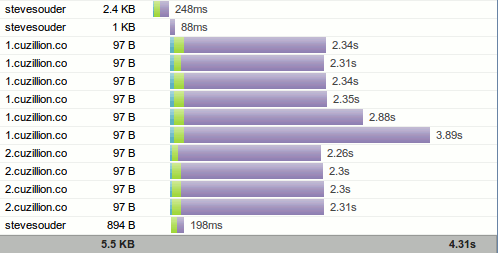
http://goo.gl/5dP6L in Firefox 3.6, loading 10 resources in parallel
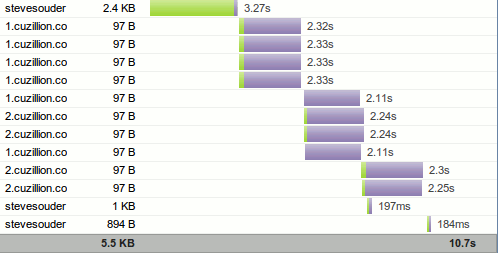
http://goo.gl/5dP6L in Android 2.2, loading only four resources at a time
Thus, it is not beneficial to Parallelize downloads across hostnames on current Android devices. We can instead Combine external CSS and JavaScript, and Combine images using CSS sprites.
We also confirm that the iPhone won’t cache large resources persistently across browser sessions. Thus, on iPhone, it may be better to break up large resources into smaller chunks, or store them in the HTML5 application cache, which is not subject to the same limitations.
Other approaches
An alternative approach is to capture mobile traffic using an HTTP proxy. However, since browsers use different connection limits when connected to a proxy, network traces captured using an HTTP proxy do not reflect the behavior of browsers when running in non-proxy mode. It was critical for us to collect HTTP traffic without changing the behavior of the browser, which is why we decided to use PCAP.
Limitations and future work
Trying to profile the browser in this way does have some limitations. Namely, it’s not possible to gather information on browser events like time-to-onload, amount of time spent parsing or executing JavaScript, or amount of time requests spend waiting in the browser’s request queue due to connection limits. The rich data provided by tools like Speed Tracer is impossible to collect using network traces. It’s also difficult to profile HTTPS traffic in this way, since it requires decrypting the secure streams first.
Going forward, we hope that mobile browser developers will provide APIs and tools that allow mobile web developers to easily collect this data directly from the mobile browser, much like desktop browser tools today.
Just the beginning
This is just the beginning of our mobile web performance work. We’ve learned a lot from existing mobile web performance best practices, and we hope to contribute with new mobile best practices. The first step is collecting and analyzing data, which we’ve begun with pcapperf. We invite you to use pcapperf or any other tools to help the web performance community understand how mobile browsers differ from desktop browsers, and in turn identify new web performance best practices specific to mobile. If you discover an interesting new mobile best practice, please share it with us in the Page Speed discussion forum.