

HTML5 introduces custom data attributes: non-visible pieces of information associated with a DOM node. This is an extremely convenient feature, especially since these attributes are accessible by both JavaScript and CSS. But what about performance? Is it possible that the use of data attributes will make your application run slower?
Accessing data
Let’s say you have an element that looks like:
<divid="mydiv"data-purpose="greeting">Hello</div>
With HTML5 you can access the custom attribute with
mydiv.dataset.purpose; // "greeting"
For older browsers you need to fall back to using getAttribute():
mydiv.getAttribute('data-purpose'); // "greeting"
DOM is slow
You know that DOM operations are a common bottleneck in dynamic web application, more so than anything you do in ECMAScript land (functions, objects, loops). And these data attributes hang on DOM nodes. Does that mean that reading and writing them in JavaScript can be slow?
Let’s write a JSPerf.com test to find out.
DIY Data utility
In the test we compare the performance of:
- using HTML5
dataset - using the fallback old school
getAttribute()andsetAttribute() - using a do-it-yourself data storage using a small
Dataobject
The Data utility creates one custom attribute __data for each DOM element we’re interested in and uses it as an auto-incremented identifier. The actual data will be stored privately in the Data object’s closure in a warehouse variable:
varData = function(){varwarehouse = {}; varcount = 1; return{reset: function(){count = 1; warehouse = {}; }, set: function(dom, data){if(!dom.__data){dom.__data = "hello" + count++; }warehouse[dom.__data] = data; }, get: function(dom){returnwarehouse[dom.__data]; }}; }();
(Side note: creating custom (expando) attributes is associated with memory leaks in IE, so it’s a good idea to cleanup all these expandos before you remove the DOM node or unload the page.)
Using this utility looks like:
Data.set(mydiv, {purpose: "greeting"}); Data.get(mydiv).purpose; // "greeting"
The test
You can run the test at jsperf.com/data-attributes.
It uses one DOM node, and writes and reads three data properties using each of the three methods: old school, dataset and DIY.
// old school attributesdiv.setAttribute('data-po', 'to'); div.setAttribute('data-ta', 'ma'); div.setAttribute('data-to', 'to'); vara = div.getAttribute('data-po'); varb = div.getAttribute('data-ta'); varc = div.getAttribute('data-to'); // HTML5 datasetdiv.dataset.po = 'to'; div.dataset.ta = 'ma'; div.dataset.to = 'to'; vardata = div.dataset; vara = data.po; varb = data.ta; varc = data.to; // DIY Data utilityData.set(div, {po: 'to', ta: 'ma', to: 'to'}); vardata = Data.get(div); vara = data.po; varb = data.ta; varc = data.to;
Results
The results show that using a simple Data utility to store data associated with a DOM node is significantly faster than storing the data in the DOM node. And the results are consistent across browsers.
Using data attributes can be anywhere between 5 to 30 times slower than using a Data object.
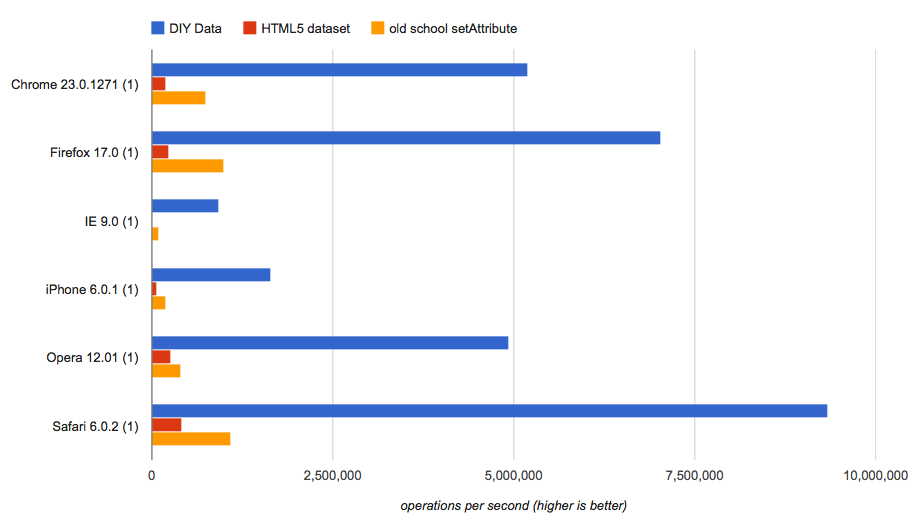
Interestingly, HTML5 dataset is the slowest, even slower than using getAttribute(), although the big difference really is between a data attribute and a Data object in ECMAScript land.
Takeaways
Using data attributes is convenient, but if you’re doing a lot of reading and writing, your application’s performance will suffer. In such cases it’s better to create a small utility in JavaScript to store and associate data about particular DOM nodes.
In this article, you saw a very simple Data utility. You can always make it better. For example, for convenience you can still produce markup with data attributes and the first time you use Data.get() or Data.set(), you can carry over the values from the DOM to the Data object and then use the Data object from then on.
Stoyan (@stoyanstefanov) is a Facebook engineer, former Yahoo!, writer ("JavaScript Patterns", "Object-Oriented JavaScript"), speaker (JSConf, Velocity, Fronteers), toolmaker (Smush.it, YSlow 2.0) and a guitar hero wannabe.

DOM about is always more slower, got it
[...] Stefanov’s “Efficient HTML5 data- attributes” talks about the performance of HTML5 data attributes and that they are slow. We have the [...]
I got curious about jQuery and what it uses internally for this — turns out it’s even slower than the HTML5 dataset.
@Matt Andrews: Took a hand at updating your test. You’ll want to reuse the $(div) so you’re not testing the speed of the jQuery object, but instead just the data access piece.
http://jsperf.com/data-attributes/3
For benchmarking equality, it seems just a tad bit off that some methods would use one set call and others would use three.
Interesting results! Very surprised to learn that dataset was slower than getAttribute.
this is very interesting, I’m surprised jQuery .data(…) is so slow in comparison,
Maybe you could send a pull request to jQuery using a similar approach (I actually thought jQuery was doing exactly this).
I think a much more common use case for data attributes is to pass down a tiny bit of element-associated, lazily evaluated, structured data with an initial html document (as opposed to an element-associated client data store, as seen in these tests).
In that context, read operations are much more important than writes. Unfortunately, the numbers don’t look much better:
http://jsperf.com/data-attributes-readonly
… and in particular, I’m surprised that dataset is so much worse than getAttribute, although I think some more thorough comparison testing is needed.
There are some additional costs associated with DIY Data in this context too (you’d have to actually execute the setter JS snippet somewhere in the document’s scripts, whereas the other techniques require no JS execution for initial setting and can be lazily deserialized from the DOM).
after checking out jQuery, it stores all data in a global object named “jQuery.cache”, so it’s still puzzling why is it so slow.
jQuery.fn.data function certainly is a bit more complex, but it seems to be following the same logic.
Its Awesome ! Thanks for sharing such kind of information
Html5 Tutorial
I’ve made a little library based on the concept, may be helpful to someone https://github.com/djalmaaraujo/data-attribute
dataset helps you also get data from custom data-* attibutes, as getAttribute() does.
But your Data implementation doesn’t help you getting this data. Even though is a lot faster, it is not serving the same purpose as the other ones.
If you want to add this behaviour to your Data implementation you have to use either dataset or getAttribute, may be as a fallback, if the supplied data to get is not in the cached object, try looking for in the data-* attribute. And this way there is a much more better implementation keeping it fast and compatible with HTML5 specs.
I appreciate it for posting “Performance Calendar » Efficient HTML5 data- attributes”.
I reallymay really end up being back for more reading through and commenting here in
the near future. With thanks, Maxie from Prime Online Solutions
“Performance Calendar » Efficient HTML5 data- attributes” was indeed a wonderful
article and therefore I personally ended up being very satisfied to discover the article.
Thank you,Lashawn
“Performance Calendar » Efficient HTML5 data- attributes” seriously causes me personally think a small amount further.
I personally adored each and every individual element of it.
Thanks a lot ,Zachery
I really blog likewise and I’m writing something related to
this excellent posting, “Performance Calendar » Efficient HTML5
data- attributes”. Will you care if perhaps Iemploy a few of your own
points? I appreciate it ,Kellie
I personally tend to go along with every
aspect that ended up being authored throughout “Performance
Calendar » Efficient HTML5 data- attributes”. Thanks for all
the tips.I appreciate it-Freeman
I really blog also and I’m authoring a thing related to this excellent blog, “Performance Calendar » Efficient HTML5 data- attributes”.
Do you really mind if perhaps I personallyuse a lot of of your suggestions?
Regards -Margery