

Nicolas Hodin is a web performance expert at Fasterize. Passionate about site-speed, front-end and UX, he works closely with clients to implement (cutting-)edge performance solutions that unleash the full potential of their websites.
What is BFCache?
The Back/Forward Cache, or BFCache, is a browser mechanism that allows a page to be restored instantly when a user uses the browser’s Back or Forward buttons.
Unlike a simple HTTP cache, BFCache preserves the entire state of the page in memory: DOM, JavaScript, application state, scroll position… When everything works as expected, navigating back triggers no reload, no network requests, and no JavaScript execution. The page reappears exactly as it was.
This mechanism is not new. Firefox introduced it as early as 2005 (Firefox 1.5), Safari followed in 2009, well before Chrome seriously adopted it in 2019. These historical implementations clearly show that BFCache is not a recent optimisation, but a long-standing browser architectural choice, brought back into focus thanks to its direct impact on user experience.
Barry Pollard already discussed it in 2022 in this WebPerf advent calendar: “Fast is good, instant is better”, as well as in an overview on web.dev.
From a Core Web Vitals perspective, the impact is significant:
- The page is served from the in-memory browser cache (and not the on-disk HTTP cache), so “TTFB” is close to… zero (but you won’t collect it in CrUX)
- The DOM is already built and styles already applied → instant FCP and LCP
- Images, fonts, videos, … are already loaded → no layout instability caused by their loading, resulting in a CLS of 0
- No (or little) JavaScript execution → no main-thread blocking, allowing user interactions to be handled immediately
This is exactly what BFCache provides: instant navigation. Back/forward navigations account for an estimated 10–20% of navigations depending on the device, which means BFCache can have a non‑negligible impact on perceived site experience.
How to measure it?
CrUX: the macro view
On the field data side, CrUX allows you to observe BFCache evolution through navigation history (Chrome browsers only).
It is easy to identify trends: gradual improvement, stagnation, or clear degradation over a given period.
In CrUXVis, go to “All Metrics” and select “Navigation Types”.

RUM: understanding eviction reasons
With a Real User Monitoring solution, you can go much further. Not only can you track navigations from all browsers, but you can also precisely identify which pages were restored from BFCache, and more importantly, why they were not.
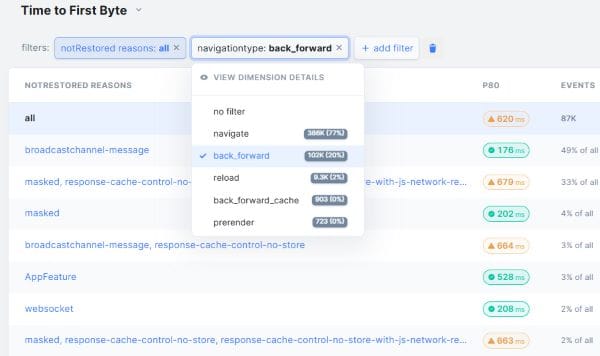
Source: RumVision dashboard
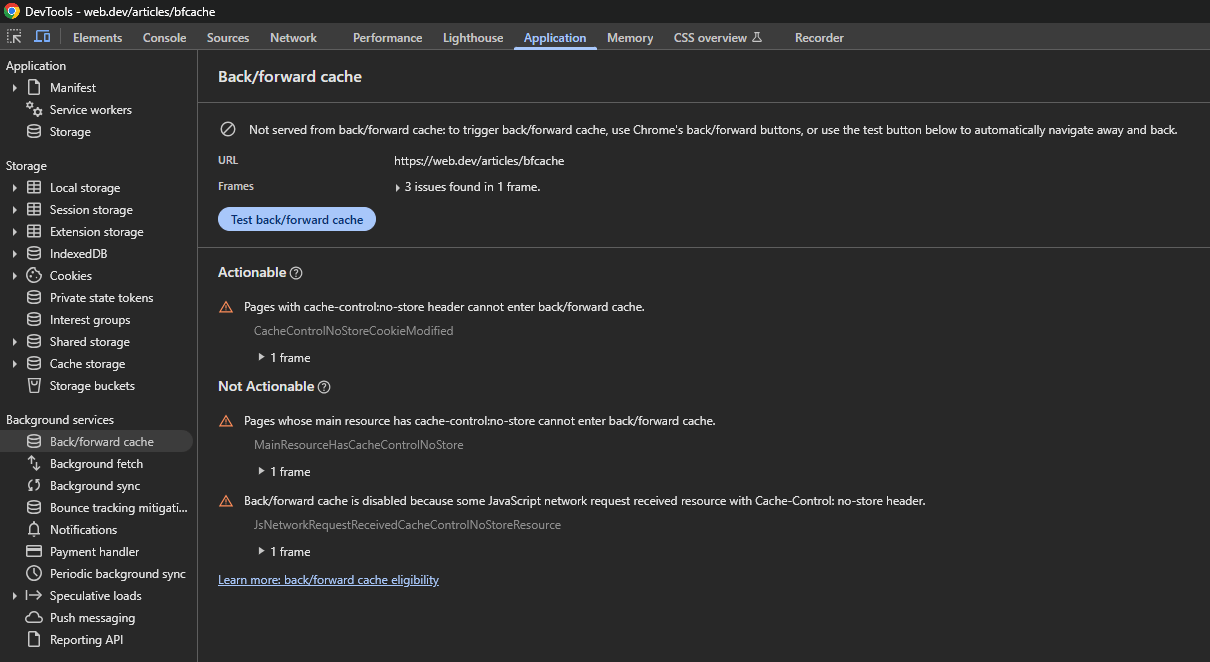
DevTools: the BFCache tool
Only Chrome provides a dedicated BFCache tool in its DevTools.
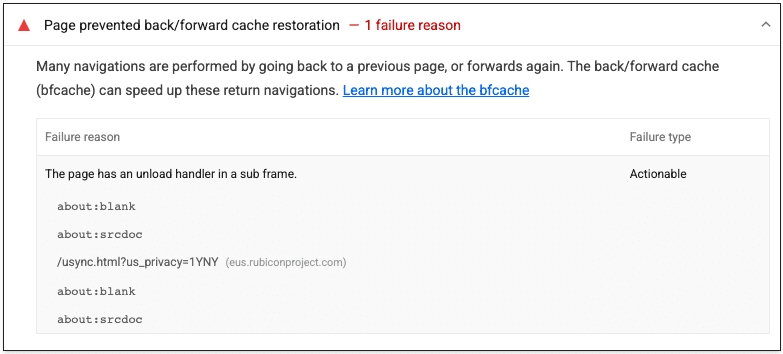
Lighthouse
This well-known diagnostic tool includes a dedicated audit for BFCache.
Performance API: from code
Finally, it is entirely possible to retrieve this information yourself using JavaScript:
// Catch page loaded through BFCache
window.addEventListener('pageshow', (event) => {
  if (event.persisted) {
      // BFCache event
      console.log("Page was loaded from the BFCache");
  }
  else {
    console.log("Page was loaded normally (not from BFCache)");
  }
});

// Get BFCache eviction reasons
const observer = new PerformanceObserver((list) => {
  const perfEntries = list.getEntries();
  perfEntries.forEach((navEntry) => {
    console.log(navEntry.notRestoredReasons);
  });
});
observer.observe({ type: "navigation", buffered: true });
What prevents BFCache?
Cache-Control: no-storeis an obvious reason: it simply prevents the browser from caching the page, even with revalidation. Chrome is currently working on reducing this limitation.- The
unloadevent on the page, but also in iframes. Prefer the more reliable and BFCache-compatible event: pagehide. This remains one of the most blocking factors for BFCache across browsers, even when introduced by third-party scripts. Chrome is currently revisiting this constraint by progressively deprecating this event on popular sites. - Poorly handled or unclosed modern APIs: IndexedDB, WebSocket, WebRTC, …
- Single-page applications (SPAs), due to their use of soft navigations, cannot benefit from BFCache
- The browser itself may also prevent caching, for example on memory-constrained devices
For a full list of detailed eviction reasons, refer to the HTML spec or MDN.
A very concrete recent degradation
At Fasterize, we optimise many French e‑commerce websites and, unsurprisingly, blocking causes are very often related to third parties. Recently, we observed a gradual drop in BFCache rate across several client sites.
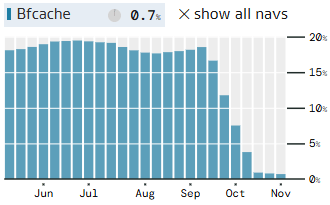
The common factor: Kameleoon, a well-known A/B testing tool in the French market, which deployed a new version based on the BroadcastChannel API. This API is very useful for communication between pages and browser tabs, but if the connection it opens is not closed at the right time, the page becomes ineligible for BFCache. Diagnosing the issue was tricky because the DevTools diagnostic tool showed no issue during direct testing, the problem only appeared during backward or forward navigation.
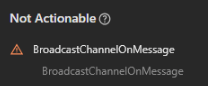
Kameleoon teams reacted quickly and applied a fix with just a few lines, closing the connection at the right moment:
Kameleoon.Utils.addEventListener(window, "pagehide", (e => {
    if (e.persisted && Kameleoon.Internals.runtime?.broadcastSynchranization) {
        Kameleoon.Internals.runtime.broadcastSynchranization?.close();
        Kameleoon.Internals.runtime.broadcastSynchranization = null
    }
}
Other observed cases
The Kameleoon case is not isolated.
We have observed other situations where third-party scripts behaviour or updates directly impact BFCache eligibility, without any change to the site’s own application code.
Recently, we observed that Facebook’s tracking script adds an unload handler. According to HTTPArchive, 9% of all web pages include this tag!
e.addEventListener("beforeunload", function() {
    n.trigger("inactive")
}),
e.addEventListener("unload", function() {
    n.trigger("inactive")
}),
In their fbevents.js script, they also use beforeunload, which is no longer blocking for BFCache but does not seem reliable in this usage.
One way to mitigate the impact of these unload events (where supported) is to use the Permissions Policy:
Permissions-Policy: unload=().
PayPal
The PayPal tag (~1% of pages) is ubiquitous on e-commerce sites and is required to offer this payment method. Unfortunately, it also adds an iframe containing an unload event, which blocks BFCache in many cases. This behaviour is entirely opaque to site owners and cannot be controlled from the host page, making it a particularly frustrating source of BFCache ineligibility despite otherwise well-optimised implementations. We’re currently working on an automatic solution to avoid this issue through EdgeSpeed optimisations.

Analytics
Analytics tools play a key role in a page’s eligibility for the BFCache. Historically, many solutions relied on events such as unload or beforeunload to trigger the sending of tracking data.
It is therefore essential for analytics tools to rely on modern mechanisms, designed to work correctly with the real page lifecycle on the web:
- The
pagehideandpageshowevents, combined with the page visibility state (document.visibilityState), provide a reliable way to detect when a page is being backgrounded, restored from the BFCache, or definitively discarded. - The
navigator.sendBeacon()API is currently the most reliable way to send tracking data asynchronously, without blocking the main thread or preventing the browser from placing the page in the BFCache.
CMS
Not all CMS platforms are equal. The main reason is the use of Cache-Control: no-store response headers, which prevent browser caching. This can be justified for sensitive pages such as checkout, payment, and customer account, but this header is unfortunately often used when there is no clear caching policy in the CMS.
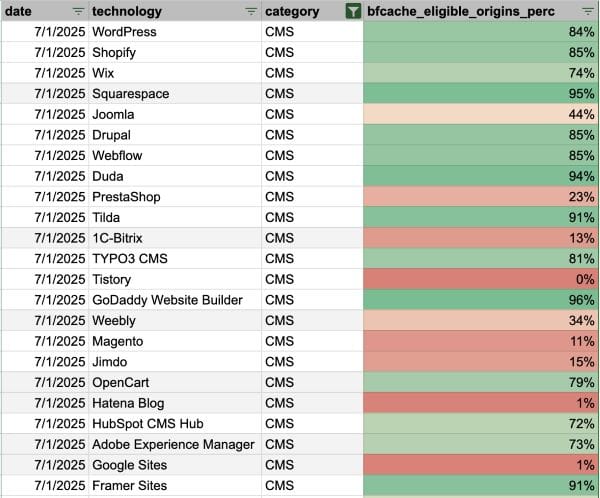
Source: Gilberto Cocchi on Webperf Slack (from HTTPArchive data)
The examples are numerous (Video players, chat widgets, A/B tools, …) and serve as a reminder that BFCache does not depend solely on site code and first-party JS, but also on external scripts loaded on the page. In practice, a single third-party change can be enough to make an otherwise well-optimised page ineligible, often without any visible regression or functional issue, making BFCache regressions a true silent performance killer.
Conclusion
BFCache is a major user experience lever, but also a fragile balance. There are many reasons why a page may not be eligible. Some are obvious, such as caching directives, and others are dependent on third-party actors who may update their scripts without notice. In practice, these changes often go unnoticed until a clear regression appears in real user data.
For this reason, I strongly recommend addressing the topic directly with your third-party service providers. When you are their client and can clearly explain that their script is impacting performance, especially by preventing BFCache usage, they are often willing to investigate and make improvements.
I consider BFCache to be a valuable cross-browser gift that is accessible to most websites, with no specific implementation cost. If you have not yet leveraged this opportunity to provide a fast and seamless experience to your users, now is the right time to start!