

Alexander Myshov (@myshov.bsky) is a senior developer working on web and mobile at Iconik
Canvas-based rendering has become a prominent tool for building complex web UI interfaces. When working with large images on canvas, one critical challenge stands out: keeping the main thread responsive during image decoding.
Unfortunately there’s no universal way to decode an image for canvas’ drawImage() without blocking the main thread across all browsers. An approach that works perfectly in Firefox will block the main thread in Chrome and Safari. The fix that works for Chrome, will block the main thread in Firefox and Safari. The search for the perfect solution becomes a game of whack-a-mole.
You might be wondering why drawImage() is necessary at all; why not just use a standard <img /> element? It’s a fair question, and the answer depends on what you’re building.
Our team builds Iconik, a cloud-based media asset management platform used by creative teams worldwide. User experience and cross-browser support are non-negotiable for us, especially when working with large media files. When we decided to rebuild our video preview scrubbing feature, we quickly hit this exact problem. The original CSS-based implementation was fragile and couldn’t deliver the smooth experience we wanted. Moving to canvas gave us the control we needed: download a sprite sheet image, render it on canvas, and apply transformations in real-time as users hover over video thumbnails. This lets users scrub through footage instantly, finding the exact frame they need without waiting for video playback; a critical workflow optimization when you’re working with hours of raw footage.
To solve this task, we needed to offload image decoding to a background thread to keep the UI responsive. During prototyping, I discovered several approaches. But as I mentioned in the introduction, the challenge was to find a solution that would work reliably across Chrome, Firefox, and Safari simultaneously.
1. Image loading without explicit decoding
This is the standard approach you’ll find in many web projects. It works fine for small images or scenarios where main thread impact isn’t critical, like loading assets during app initialization.
function loadImage() {
    const imageUrl = 'https://example.com/image.jpg'
    const image = new Image();
    image.decoding = "async";
    image.onload = () => {
        const canvas = document.getElementById('canvas');
        const ctx = canvas.getContext('2d');
        ctx.drawImage(image, 0, 0);
    };
    image.src = imageUrl;
}
Blocks Chrome, Firefox, Safari
2. Image loading with decode
This approach uses the lesser-known decode() method to explicitly handle image decoding. It’s a step in the right direction, but browser support is inconsistent.
function loadImage() {
    const imageUrl = 'https://example.com/image.jpg'
    const image = new Image();
    image.decoding = "async";
    image.onload = () => {
        image.decode().then(() => {
            const canvas = document.getElementById('canvas');
            const ctx = canvas.getContext('2d');
            ctx.drawImage(image, 0, 0);
        })
    };
    image.src = imageUrl;
}
Works without blocking Firefox
Blocks Chrome, Safari
3. Image loading with decode and OffscreenCanvas
This combines decode() with OffscreenCanvas. Unfortunately, it still doesn’t solve our cross-browser problem.
function loadImage() {
    const imageUrl = 'https://example.com/image.jpg'
    const image = new Image();
    image.decoding = "async";
    image.onload = () => {
        image.decode().then(() => {
            const offscreen = new OffscreenCanvas(800, 600);
            const offscreenCtx = offscreen.getContext("2d");
            offscreenCtx.drawImage(image, 0, 0);

            const canvas = document.getElementById('canvas');
            const ctx = canvas.getContext('bitmaprenderer');
            const bitmap = offscreen.transferToImageBitmap();
            ctx.transferFromImageBitmap(bitmap);
        })
    };
    image.src = imageUrl;
}
Works without blocking Firefox
Blocks Chrome, Safari
4. Image loading with decode and createImageBitmap
Now we’re getting somewhere. Using createImageBitmap() with an HTMLImageElement finally gives us non-blocking behavior in Safari, but Chrome still blocks.
function loadImage() {
    const imageUrl = 'https://example.com/image.jpg'
    const image = new Image();
    image.decoding = "async";
    image.onload = (r) => {
        image
            .decode()
            .then(() => createImageBitmap(image))
            .then(bitmap => {
                const canvas = document.getElementById('canvas');
                const ctx = canvas.getContext('2d');
                ctx.drawImage(bitmap, 0, 0);
            });
    };
    image.src = imageUrl;
}
Works without blocking: Firefox, Safari
Blocks: Chrome
5. Image loading with decode and createImageBitmap from blob
Here’s the solution for Chrome: using createImageBitmap() with a Blob instead of an HTMLImageElement. Finally, Chrome’s main thread doesn’t block!
function loadImage() {
    const imageUrl = 'https://example.com/image.jpg'
    fetch(imageUrl)
        .then(image => image.blob())
        .then(blob => createImageBitmap(blob))
        .then(bitmap => {
            const canvas = document.getElementById('canvas');
            const ctx = canvas.getContext('2d');
            ctx.drawImage(bitmap, 0, 0);
        });
}
Works without blocking: Chrome
Blocks: Firefox, Safari
6. Image loading with decode and createImageBitmap from blob in a web worker
This one is kind of a bonus. This approach works in Safari and Chrome, but I wouldn’t recommend it. The added complexity and fragility aren’t worth it for most use cases.
const workerScript = `
  self.onmessage = function (e) {
      fetch(e.data)
          .then(image => image.blob())
          .then(blob => createImageBitmap(blob))
          .then(imageBitmap => {
                postMessage(imageBitmap, [imageBitmap])
          });
  }
`;
const workerBlob = new Blob([workerScript], {
    type: 'application/javascript',
});
const worker = new Worker(URL.createObjectURL(workerBlob));

function loadImage() {
    const imageUrl = 'https://example.com/image.jpg'
    worker.onmessage = function (e) {
        const canvas = document.getElementById('canvas');
        const ctx = canvas.getContext('2d');
        ctx.drawImage(e.data, 0, 0);
    };

    worker.postMessage(imageUrl);
}
Works without blocking: Chrome and Safari
Blocks: Firefox
Final solution
For a solution that works across all three browsers, we need to combine methods 4 and 5.
js
function isChromium() {
    return Boolean(window.chrome);
}

function fastDrawImage() {
    const imageUrl = './url_for_your_image.png';
    if (isChromium()) {
        fetch(imageUrl)
            .then(image => image.blob())
            .then(blob => createImageBitmap(blob))
            .then(bitmap => {
                const canvas = document.getElementById('canvas');
                const ctx = canvas.getContext('2d');
                ctx.drawImage(bitmap, 0, 0);
            });
    } else {
        const image = new Image();
        image.decoding = "async";
        image.onload = (r) => {
            image
                .decode()
                .then(() => createImageBitmap(image))
                .then(bitmap => {
                    const canvas = document.getElementById('canvas');
                    const ctx = canvas.getContext('2d');
                    ctx.drawImage(bitmap, 0, 0);
                });
        };
        image.src = imageUrl;
    }
}
This approach successfully offloads image decoding for Firefox, Chrome, and Safari, preventing main thread blocking.
Results
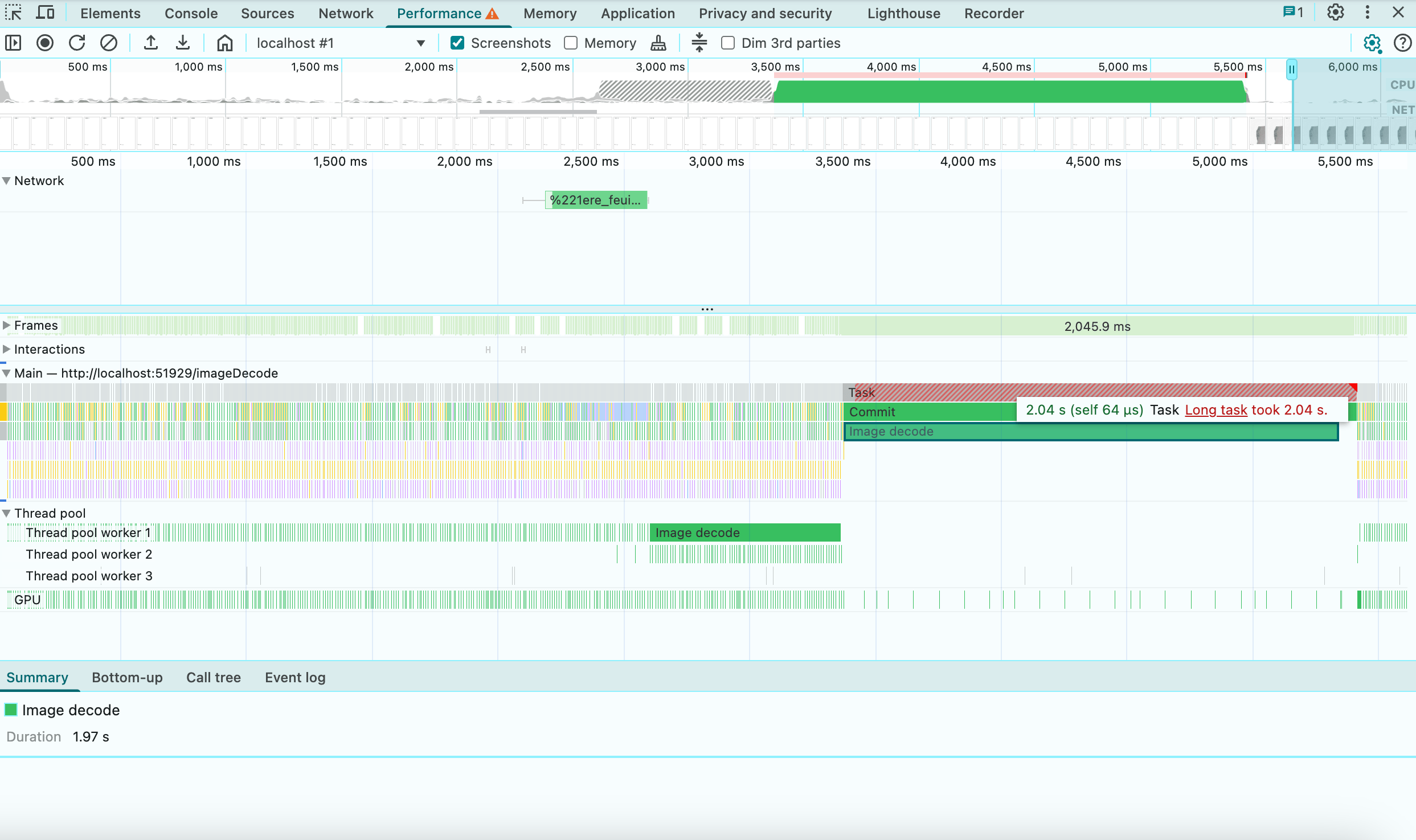
Results from Chrome Profiler before the fix
(Macbook M1, with 6x CPU throttling, ~7mb image data)
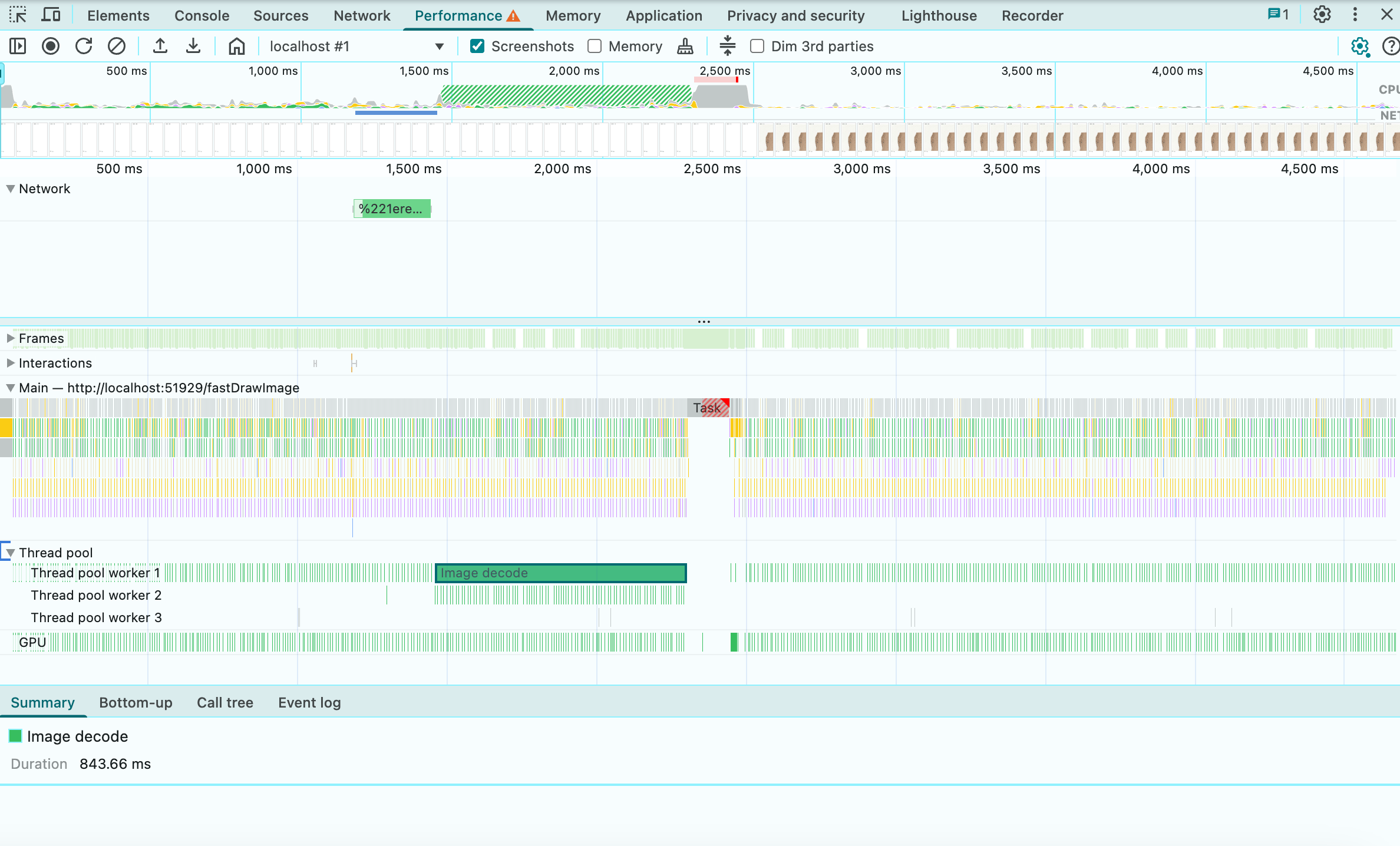
Results from Chrome Profiler after the fix
(Macbook M1, with 6x CPU throttling, ~7mb image data)
Final thoughts
The improvement is significant when working with large sprite sheets or high-resolution images; the kind of media assets our users work with daily. In production, this change eliminated UI jank during video preview interactions and kept our interface responsive. We’ve managed to circumvent the blocked main thread, but ideally it would be great if Chrome and Safari aligned their implementations with the specification. For now it is implemented correctly only in Firefox.
If you’re building canvas-based image rendering features, whether for video scrubbing, image editing tools, or interactive visualizations, this cross-browser approach will help you maintain a smooth, responsive UX.