

Paul Calvano (@paulcalvano.bsky.social) is a Performance Architect at Etsy, where he helps optimize the performance of their marketplace. Prior to that he worked as a web performance consultant at Akamai and Keynote (now Dynatrace), helping websites optimize their performance since as early as 2000. Paul is a co-maintainer of the HTTP Archive, an open source project that has been tracking the evolution of the web since 2010. He's an author of various chapters of the 2019 Web Almanac and also a co-organizer of the NY Web Performance Meetup group.
You’ve heard it many times – third party content can easily cause an otherwise well performing website to become sluggish and slow. And depending on how this content is loaded, it can also introduce single points of failure (SPOFs). When a large cloud provider or content delivery network (CDN) experiences a disruption, their impacts are felt across the world and often trigger headlines about the many websites that were affected. However, there are numerous secondary impacts triggered by third party content, which can be disruptive even to companies that don’t use the affected provider.

In this blog post I’ll discuss some of the performance and availability risks associated with third party content and how you can test for these single points of failure (SPOFs) on your websites. I’ll use HTTP Archive data to explore how many sites could be at risk and RUM Archive to get a sense of how prone to slowdowns some of these third parties are!
Third Party Failure = SPOF
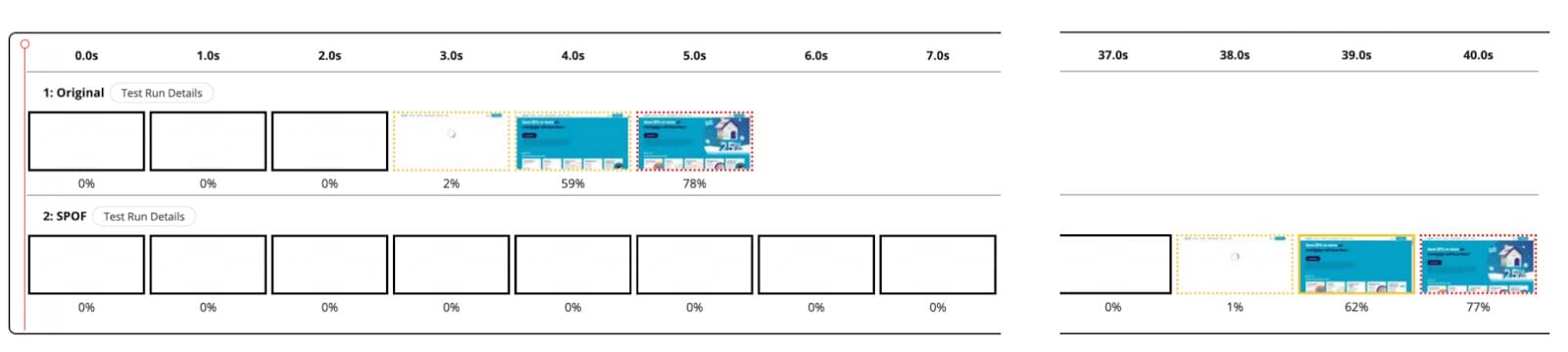
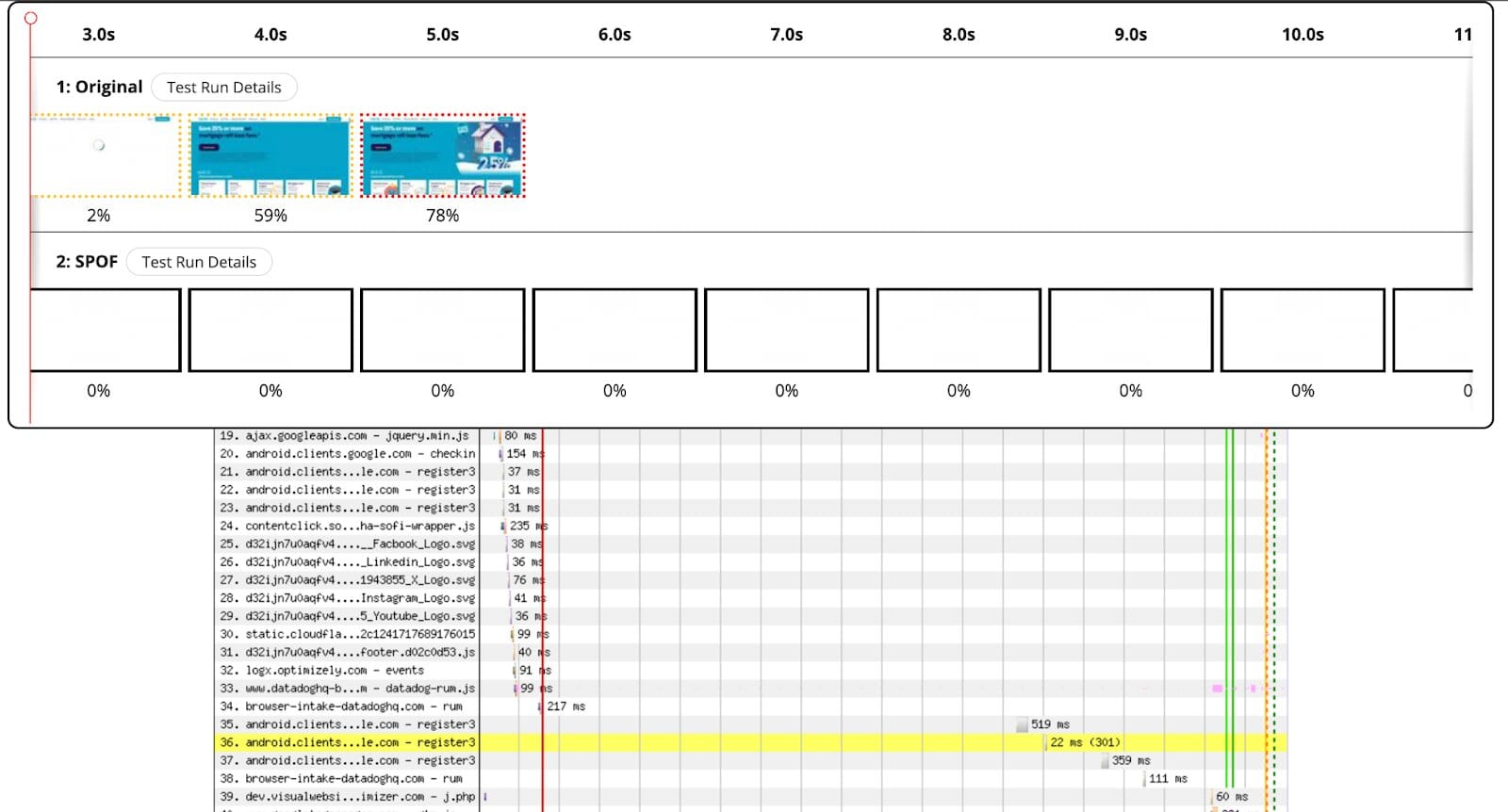
A third-party single point of failure (SPOF) can occur when a website depends on an external service for critical or render-blocking resources. If the third party content fails to load, then the page load may be stalled until the request times out. For example, in the two filmstrips (taken from a WebPageTest private instance) you can see how a failure of a third-party affects the user experience. The SPOF measurement in this example simulates what a client would see if a render-blocking third party, such as a consent management service, became unavailable. In this case, the user would essentially see a blank screen until the third party request times out.
Most recently, people have been noticing SPOFs due to outages experienced by large cloud providers and CDNs. For example, a major CDN recently experienced a few high profile outages and many of their customers were impacted. However, many sites that don’t use their services directly were also affected due to third party content that was being delivered through them. That could have been avoided by self hosting content that is critical to loading of the website.
This risk isn’t just isolated to CDNs, nor is it a new issue. For example, many years ago websites started adding Facebook like buttons to their pages via synchronously loaded scripts. When Facebook experienced an outage way back in 2012, the failed third party requests slowed down a large number of websites and browsers were stalled waiting for a script to load. Facebook fixed this a long time ago, and even introduced a non-blocking script loader pattern for other websites to adopt. Additionally, the like button is being deprecated in February 2026. They plan to return an empty response to avoid issues on sites that will inevitably forget to remove them!
There have been other occurrences where a third party stops providing their service or is compromised as well. Using the HTTP Archive, we can see how many websites are still referencing this old content. For example:
- RawGit announced it was shutting down in 2018. Their webpage recommends alternatives, but based on the November 2025 HTTP Archive data, there are over 25K websites still requesting content from it!
- In February 2024, the Polyfill.io service was sold to a third party and concerns were raised immediately about what that meant for sites using the service. By June 2024 it was used to deliver malicious content via a supply chain attack. Based on HTTP Archive data, I can see references to this third party on 161K websites in February 2024, and then it gradually decreased from 115K to 109K through June 2024! All occurrences of its use stopped after July 2024 – possibly due to intervention by browser vendors and their domain registrar taking down the domain name.
Non-web applications can also experience issues from third party failures as well. For example, a while back one of Etsy’s CDNs experienced an incident and I needed to fail over our traffic to our other CDN. During the failover, I discovered that part of the process for this CDN failover actually relied on a third party which had a dependency on the same CDN I needed to route away from! To avoid a similar occurrence, a break-glass failover mechanism was created to bypass all dependencies on CDNs during a failover event.
But I Don’t Use <Provider>?
When you add a third party to your website, you are telling the browser to load their content as if it were your own. Depending on how that content is loaded, it could block the page from rendering anything to the screen. If a render-blocking third party happens to be served by a provider that is experiencing a performance degradation or outage, then the site’s performance may be significantly affected.
Any third party content added to your website carries risks, and should be added with care and tested thoroughly. However, extra care should be taken when it comes to render-blocking requests. This isn’t new advice either – Steve Souders first wrote about this in 2010! There have been PerfPlanet articles about this dating back to 2011 (just search for SPOF)! A simple recommendation remains relevant 15 years later: avoid third party single points of failure, and test/monitor your pages to ensure that none are introduced.
How Prevalent are Third Party SPOFs Today?
I’m raising a lot of concern about a problem that has been well-known and talked about for over 15 years. You might wonder how much of an issue this can still be on today’s web. According to the December 2025 HTTP Archive dataset, a shocking 67.7% (of 15.78 million websites) request at least one render-blocking third party! Note: This classification is based on request URLs that are from a different domain name than the page URLs. This does not include subdomains of the page URLs host, which means the actual numbers may be higher!
Additionally, 60% (9.4 million) of sites load at least one render-blocking third party through a different CDN from their primary content! Even more shocking is that there are over 1 million websites loading render-blocking content via a third party that does not use a CDN at all!
| Sites with Render Blocking Third Parties – HTTP Archive December 2025 | ||
| Category | Number of Sites | % of Sites |
| Number of Sites | 15,780,490 | |
| Sites with a Render Blocking Third Party | 10,683,209 | 67.70% |
| Sites with a Render Blocking Third Party on a different CDN | 9,444,516 | 59.85% |
| Sites with a Render Blocking Third Party not using a CDN | 1,075,294 | 6.81% |
If we focus on the websites that have a render-blocking third party hosted on a different CDN, you can see that the request types skew towards CSS and JavaScript (with many sites loading both of these types of requests).

When we break this down by hostname and content type, you can see that Google Fonts is one of the larger sources of render-blocking third parties. There are also other font providers like Typekit and Fontawesome as well. Since CSS is generally render-blocking, including third party CSS for font loading may introduce a SPOF risk!
Additionally, there are hundreds of thousands of sites that are utilizing third parties to load libraries onto their sites. For example, cdnjs.cloudflare.com, cdn.jsdelivr.net, ajax.googleapis.com, code.jquery.com, maxcdn.bootstrapcdn.com, and unpkg.com. If you find yourself using any of these to deliver content that is critical to the loading of your website, I highly encourage you to read Harry Roberts’s excellent writeup about why you should self host your static assets.
| Websites w/ Third Party Content – HTTP Archive December 2025 | |||||
| hostname | css | script | other | html | text |
| fonts.googleapis.com | 5,837,138 | 22 | |||
| www.gstatic.com | 1,277,310 | 1,273,686 | |||
| cdnjs.cloudflare.com | 675,493 | 390,541 | 9 | 115 | |
| cdn.jsdelivr.net | 660,322 | 351,682 | 20 | 34 | 6 |
| www.youtube.com | 772,925 | 39,762 | 5 | ||
| ajax.googleapis.com | 57,354 | 702,890 | |||
| code.jquery.com | 67,244 | 368,220 | |||
| maxcdn.bootstrapcdn.com | 332,198 | 49,794 | |||
| use.fontawesome.com | 315,930 | 21,300 | 6 | ||
| tpc.googlesyndication.com | 173 | 299,810 | |||
| use.typekit.net | 251,913 | 43,365 | 6 | 71 | |
| static.xx.fbcdn.net | 147,085 | 136,605 | |||
| p.typekit.net | 272,158 | ||||
| static1.squarespace.com | 236,853 | 6,458 | |||
| definitions.sqspcdn.com | 204,076 | 37,235 | |||
| unpkg.com | 127,853 | 84,910 | 13,738 | ||
| pagead2.googlesyndication.com | 435 | 203,536 | 204 | ||
| www.google.com | 326 | 186,648 | 146 | 14,379 | |
| assets.squarespace.com | 135,575 | 41,561 | |||
| c0.wp.com | 85,064 | 90,345 | |||
| stackpath.bootstrapcdn.com | 101,810 | 27,460 | |||
| kit.fontawesome.com | 4,497 | 101,627 | 14 | ||
| maps.googleapis.com | 98,646 | ||||
| a.amxrtb.com | 97,849 | ||||
| cdn-cookieyes.com | 91,836 | 10 | |||
| consent.cookiebot.com | 79,041 | ||||
| t1.daumcdn.net | 22,278 | 54,285 | |||
Third Party Slowdowns
While major cloud provider failures are not a frequent occurrence, slowdowns and microoutages absolutely are. If your content is delivered by a third party then the performance of that content is out of your control. Self hosting where possible will put you in control of the delivery of this content and reduce the risk of a slowdown triggered by a third party. If you have to load any content from a third party, you can (and should) test for single points of failure and monitor their performance.
Some Real User Monitoring (RUM) services have the ability to collect resource timing data, which makes it possible to monitor third party content across all your site’s visitors. You can also monitor via synthetic measurements as well – which may be helpful in case payload sizes drastically increase. At Etsy I use Speedcurve’s performance budgets to detect shifts in quantifiable metrics (such as requests, sizes, etc). I often correlate alerts with our RUM data to determine if a third party change resulted in a slowdown, and also add custom metrics for third parties that may present a SPOF risk. In the example below, you can see that the number of blocking scripts and stylesheets are consistently low – but the budget is set so that any shift from the high-water mark will trigger an alert.
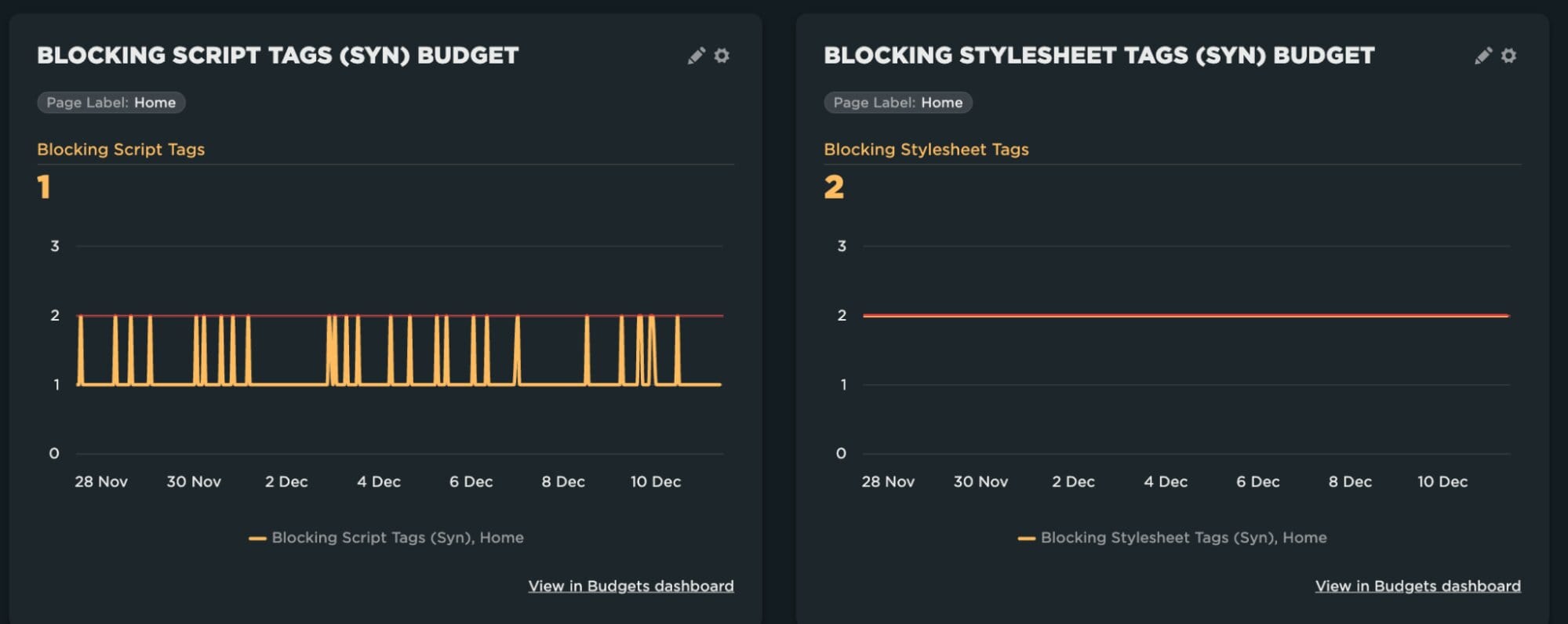
Speedcurve also provides the ability to track individual third parties as part of their performance budgets – which can be helpful if you have identified a third party that you want to track over time.
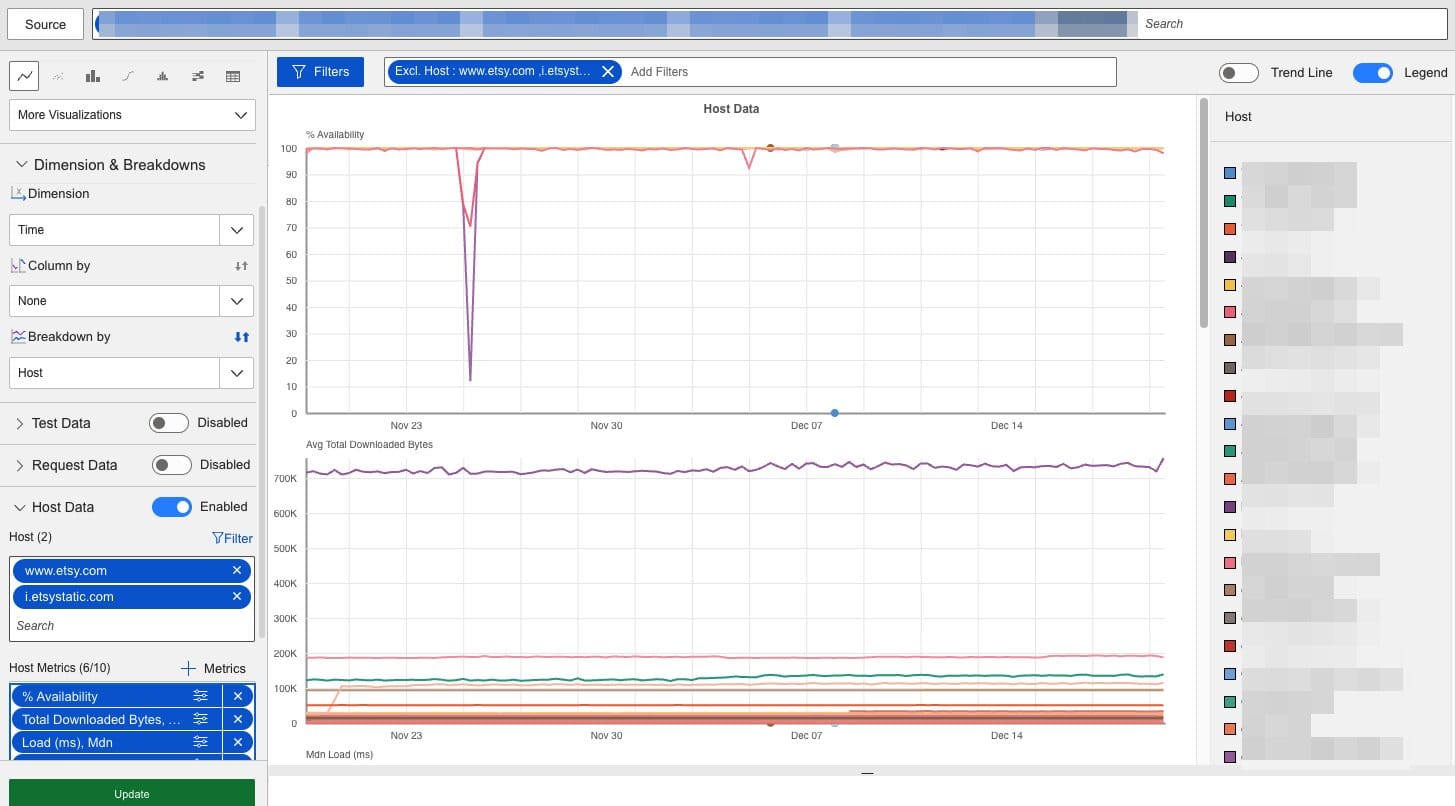
I’m also using Catchpoint to trend third party domains over time. In the graph below, I’m aggregating results from a large number of Chrome synthetic measurements, grouping the results by hostname, and excluding first party domains. This type of reporting provides the ability to monitor all discovered third parties over time; collecting insights into their performance, availability, request counts and payload sizes. In the example below you can see that one of the third parties experienced a large outage on November 25th, and another experienced a smaller outage on December 5th. Fortunately these were not render blocking and did not impact the user experience.
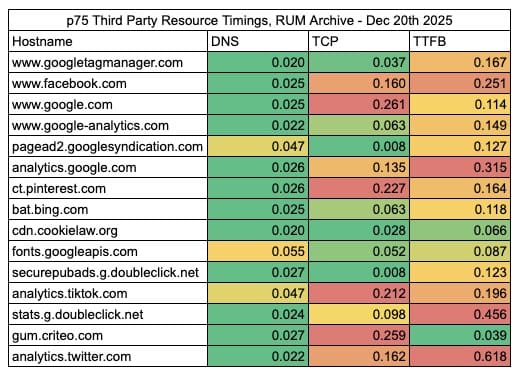
The RUM Archive is also an interesting project for analyzing third party performance data. This dataset comes from approximately 100 of Akamai’s customers’ mPulse data. While this will not capture as many third parties as we can observe in the HTTP Archive, it does provide the ability to look at their real world performance data! When I combined these two data sources for render blocking third parties, I found 15 third parties that had at least 1 million RUM measurements. The table below breaks down their DNS, TCP and TTFB times. Many of these third parties have relatively fast DNS times, but there’s a lot of room for improvement when it comes to TCP connection times and TTFB.
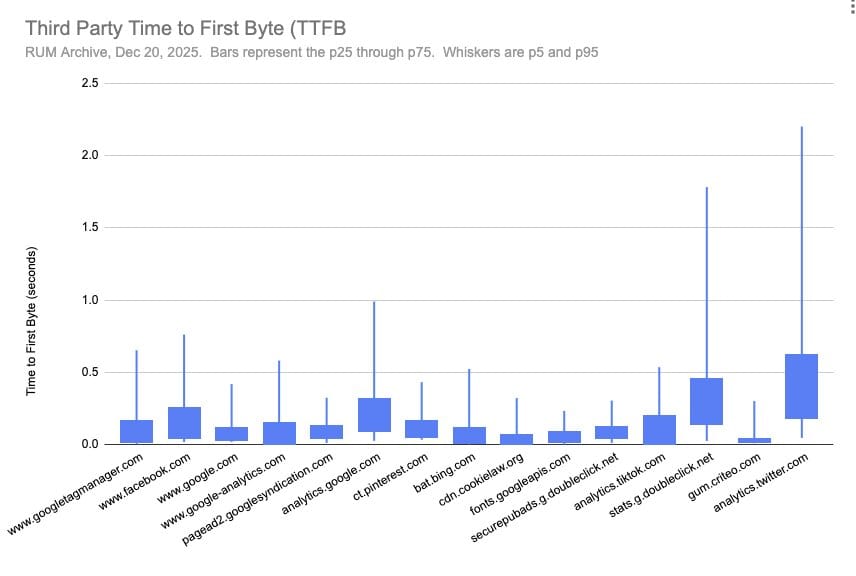
While the table above illustrates the p75 timings, we can also look at other percentiles as well to get a larger picture of the overall performance impact of these third parties. The graph below illustrates the inter-quartile range for TTFB, with the bars representing the p25 through p75 – essentially 50% of all measurements. The whiskers represent the p5 and p95. A few third parties stand out for having very poor TTFB, while CookieLaw and Criteo seem to have the fastest and most consistent performance.
How to Detect Render-Blocking Third Parties
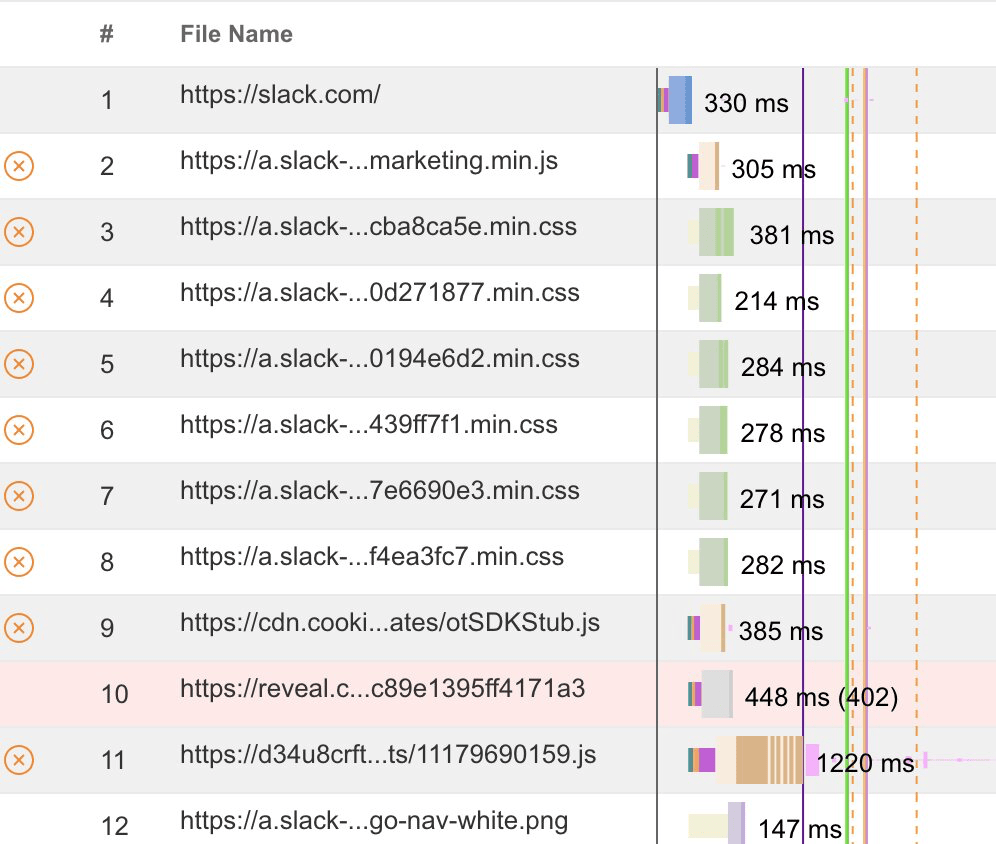
When you run a test in WebPageTest, you can see a yellow circle with an X in the waterfall next to each request that is render-blocking. A similar visual is used in the legacy UI if you are using a WebPageTest private instance. If you notice any render blocking third party domains, then make a note of them so that you can run SPOF tests.
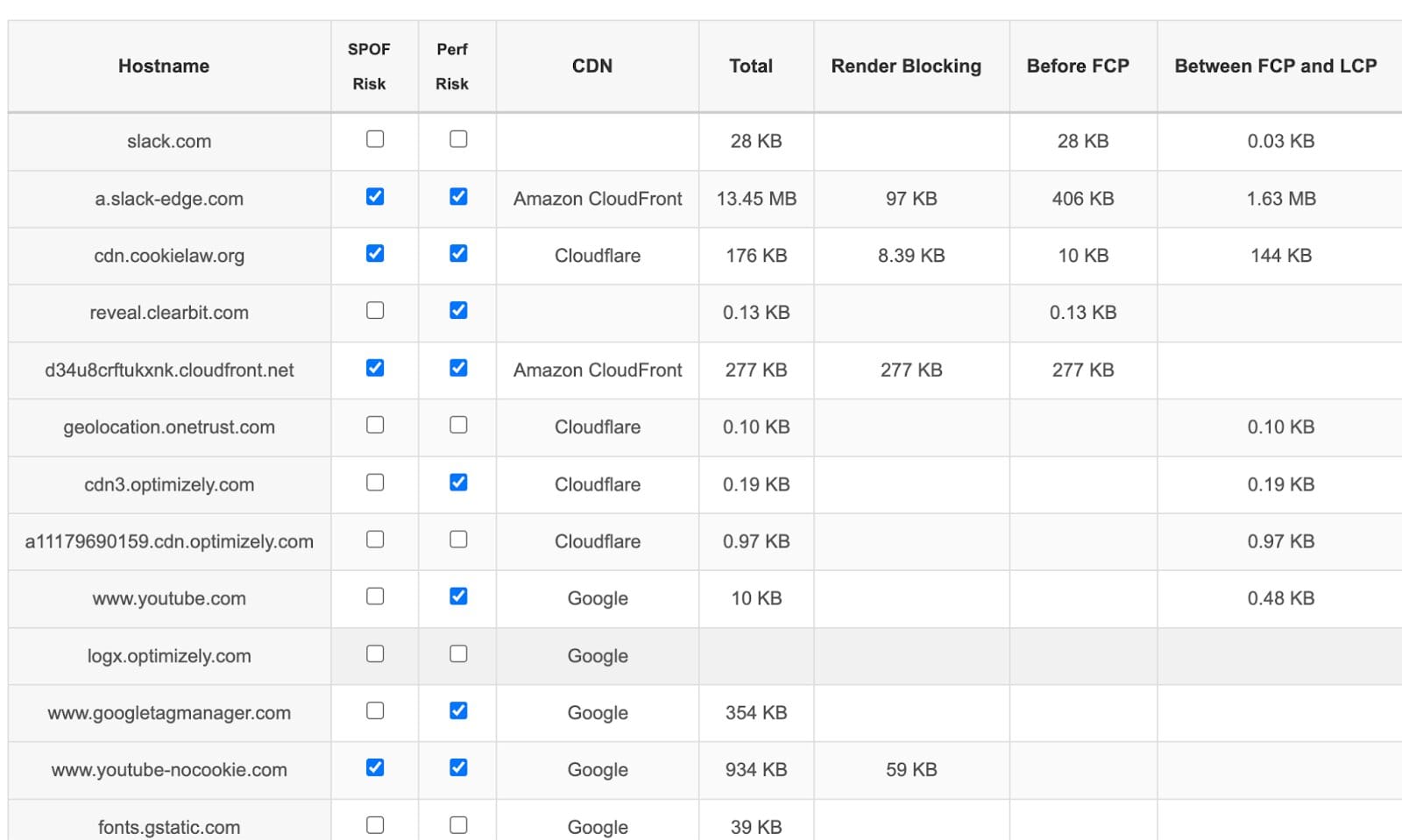
There’s also my Third Party Analyzer tool, which will highlight SPOF risks based on resources that are render blocking and load before FCP. This works with any WebPageTest private instance tests, Catchpoint WPT shared URLs, or Speedcurve tests. You can read more about this tool here.
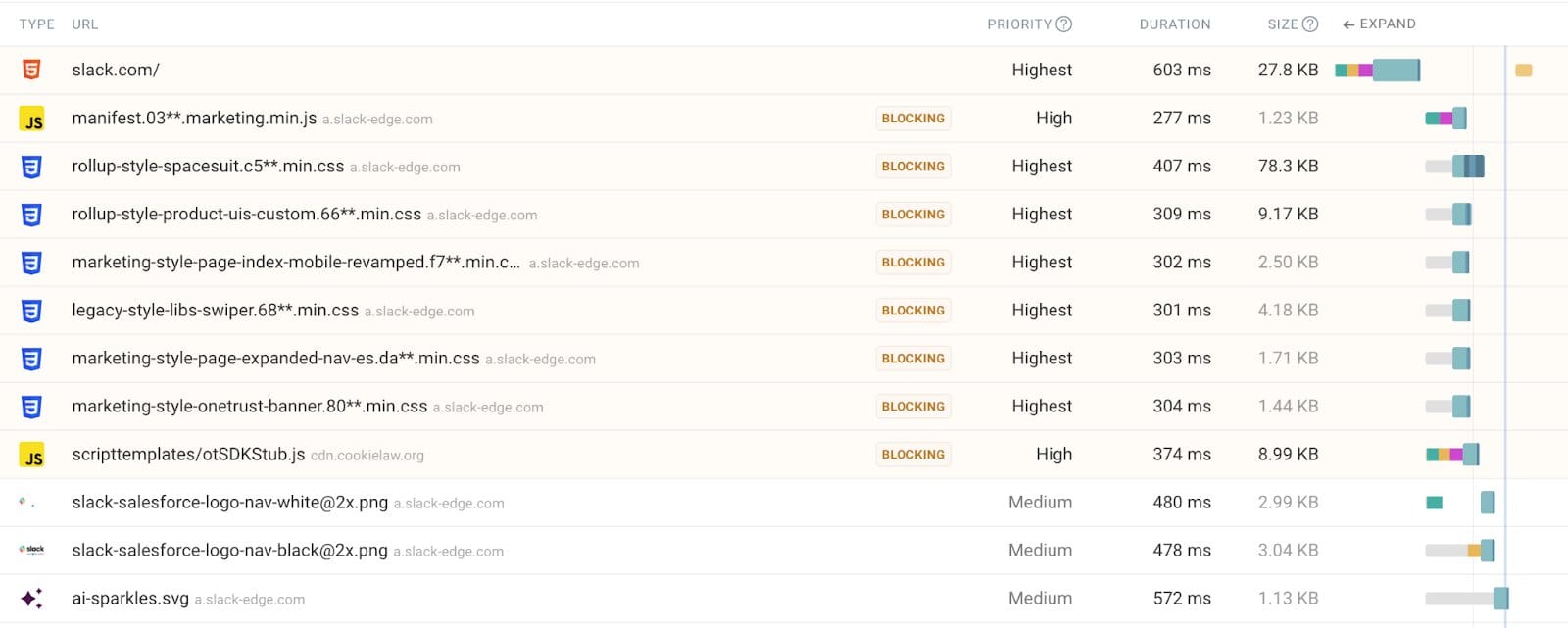
If you run a measurement with DebugBear, you can see a “Blocking” indicator next to every resource that is render-blocking. They also illustrate the priority of each request as well as the domain name. Similar to the previous examples, if you see render-blocking content for a third party domain name, then make a note of them so that you can run SPOF tests.
And lastly, you can also see requests via a Lighthouse test. As with the other examples, just look at the list of requests and determine which of these are third parties.
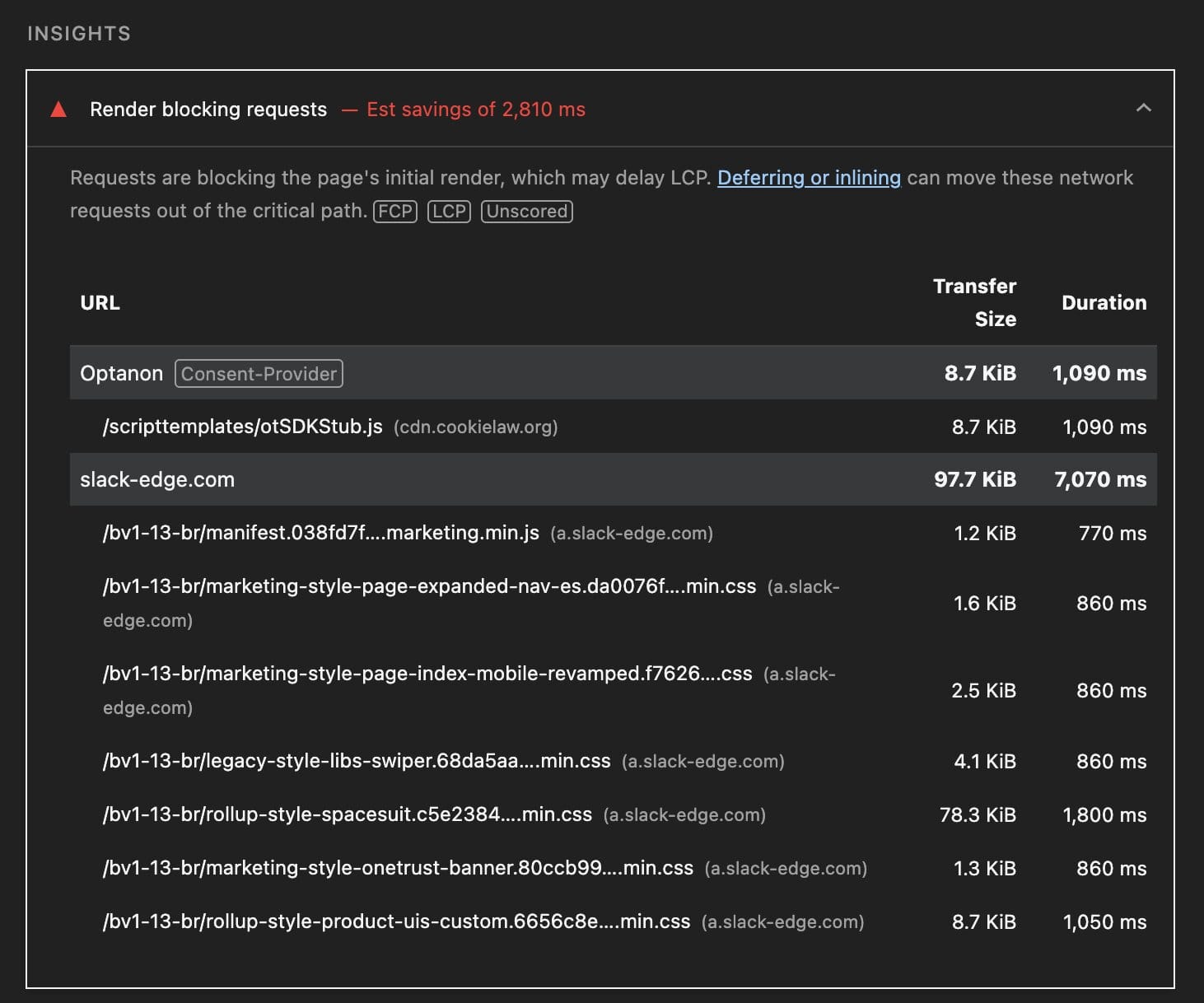
How to Test for Third Party SPOFs
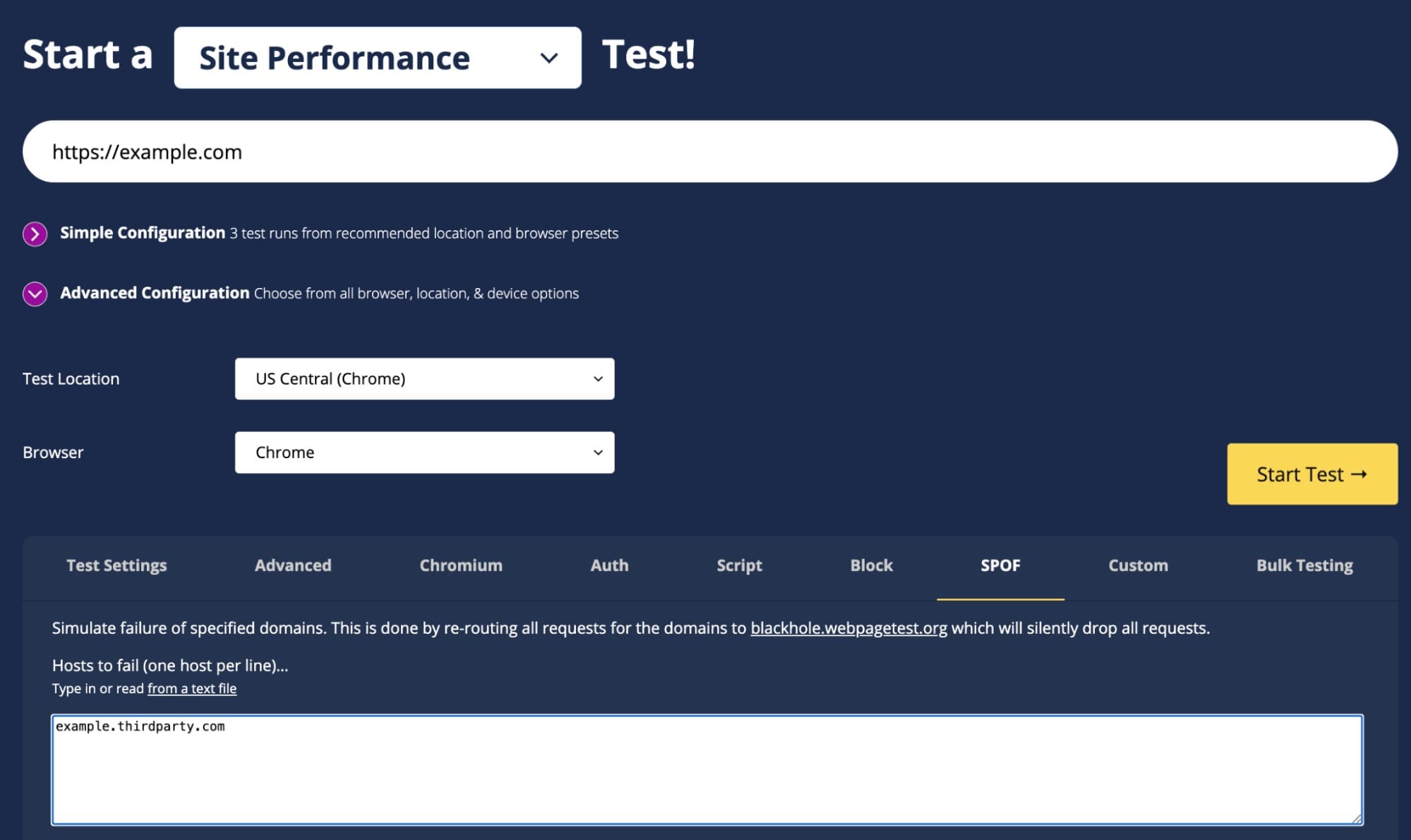
The most common way of testing for third party single points of failure is to identify which content is render-blocking, and then to test what would happen if that content fails. For years, the easiest way of testing for SPOFs was via WebPageTest as it had a SPOF simulation feature. Today, there are a handful of other methods of testing for them and below I’ll show a few examples.
WebPageTest Private Instance
In my earlier example I used a WebPageTest private instance, which has a feature that simulates a SPOF. When you add a hostname to the list, it will run two tests – one without any changes and the other with the hostname routed to a server that silently drops the request (simulating a failure). The results of this test show two filmstrips, and you can easily determine whether the page rendering is stalled when the third party failed to load.
Catchpoint WebPageTest
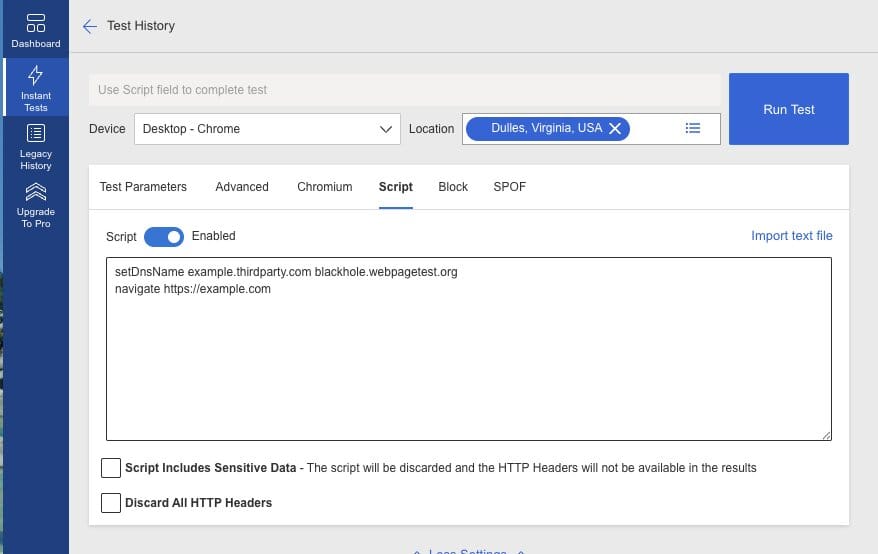
There is also a SPOF feature in the public WebPageTest instance hosted by Catchpoint. At the time of writing this, the SPOF feature is not currently working. Once the feature is fixed, it should work the same as the above example. Until then you can still use WebPageTest to simulate a third party failure by using a script that overrides DNS for the third party, pointing it to blackhole.webpagetest.org. This emulates how the SPOF feature in WebPageTest works.
Hosts File Entries
You can use a hosts file to override DNS and route one or more third parties to blackhole.webpagetest.org. In order to do this, look up the IP address of the blackhole hostname. At the time of writing, it resolved to 3.219.212.117.
Next you can update your /etc/hosts file (Mac) or C:\Windows\System32\drivers\etc\hosts file (Windows). You can add one or more third party hostnames. Once the browser picks up the new hosts file entries, you’ll be able to test for failure by simply browsing to the site you are testing.
3.219.212.117 cdn.cookielaw.org cdn.optimizely.com
Chrome DevTools
Chrome DevTools has recently added an individual request throttling feature in Chrome. This feature should be enabled with Chrome 144, but if you are using an earlier version (or Chrome Canary) then you can enable an experimental flag to allow individual request throttling. You can find this flag at chrome://flags/#devtools-individual-request-throttling. DebugBear shared a great blog post about how to use this feature here.
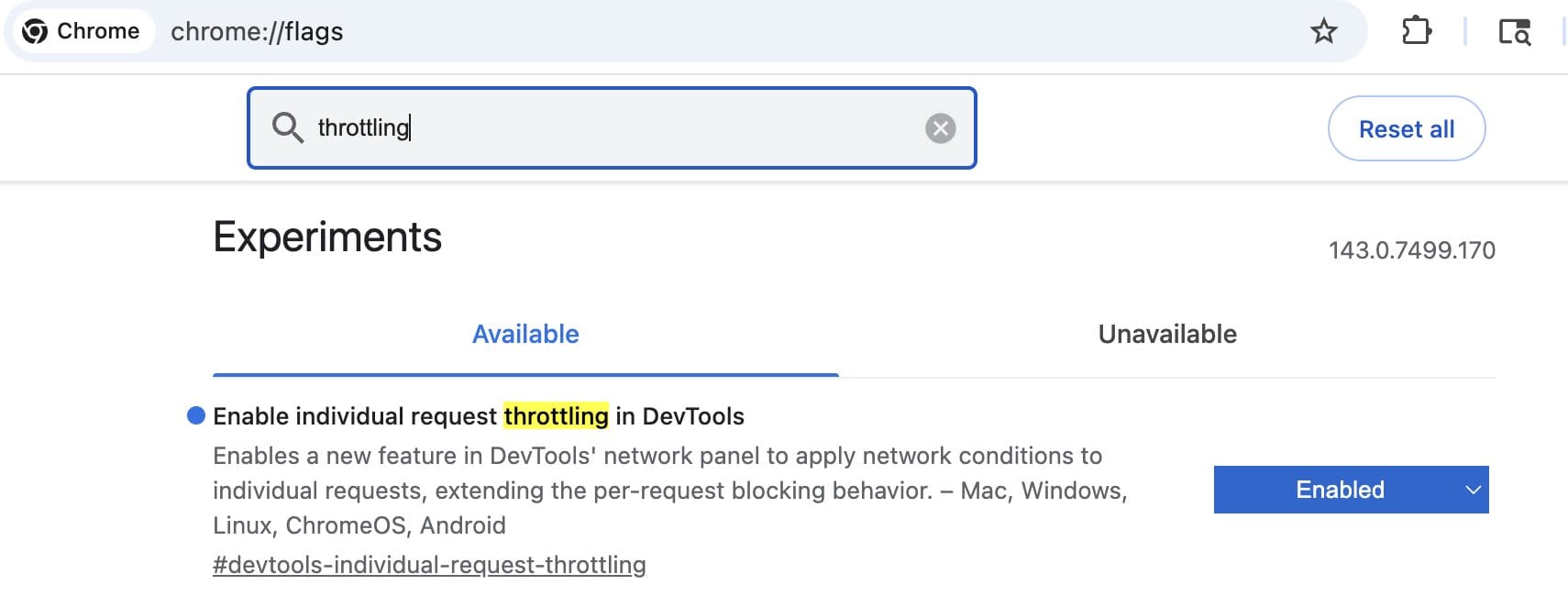
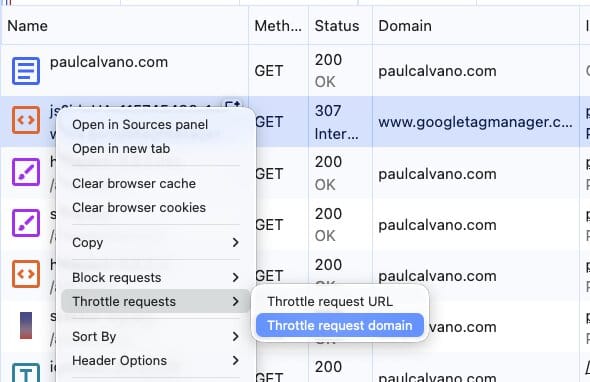
Once enabled, you’ll be able to throttle a request or domain by selecting a network profile for the content. The default options are Block, Fast 4G, Slow 4G and 3G.
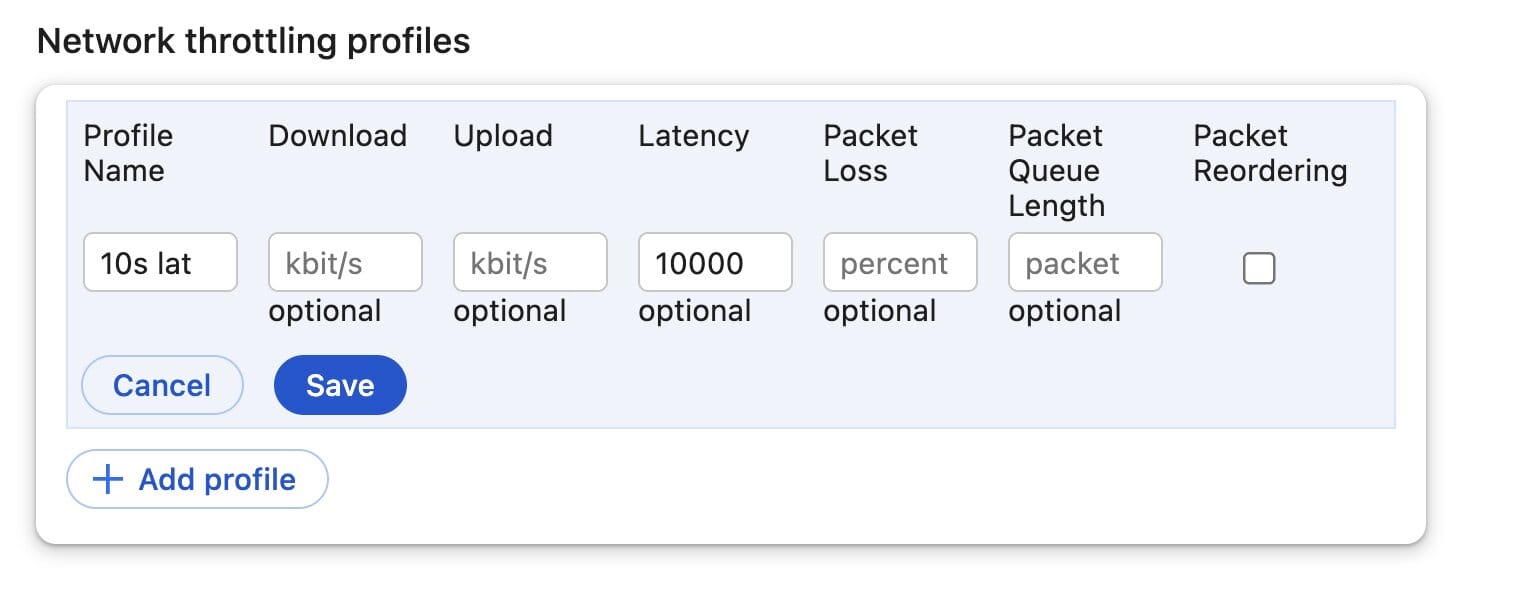
To simulate a single point of failure, I wanted something even slower than 3G. So in the network throttling profile section, I defined a profile that adds 10 seconds of latency. When you refresh the page with this profile, you can experience the site in your browser as if the third party was struggling to load the content.
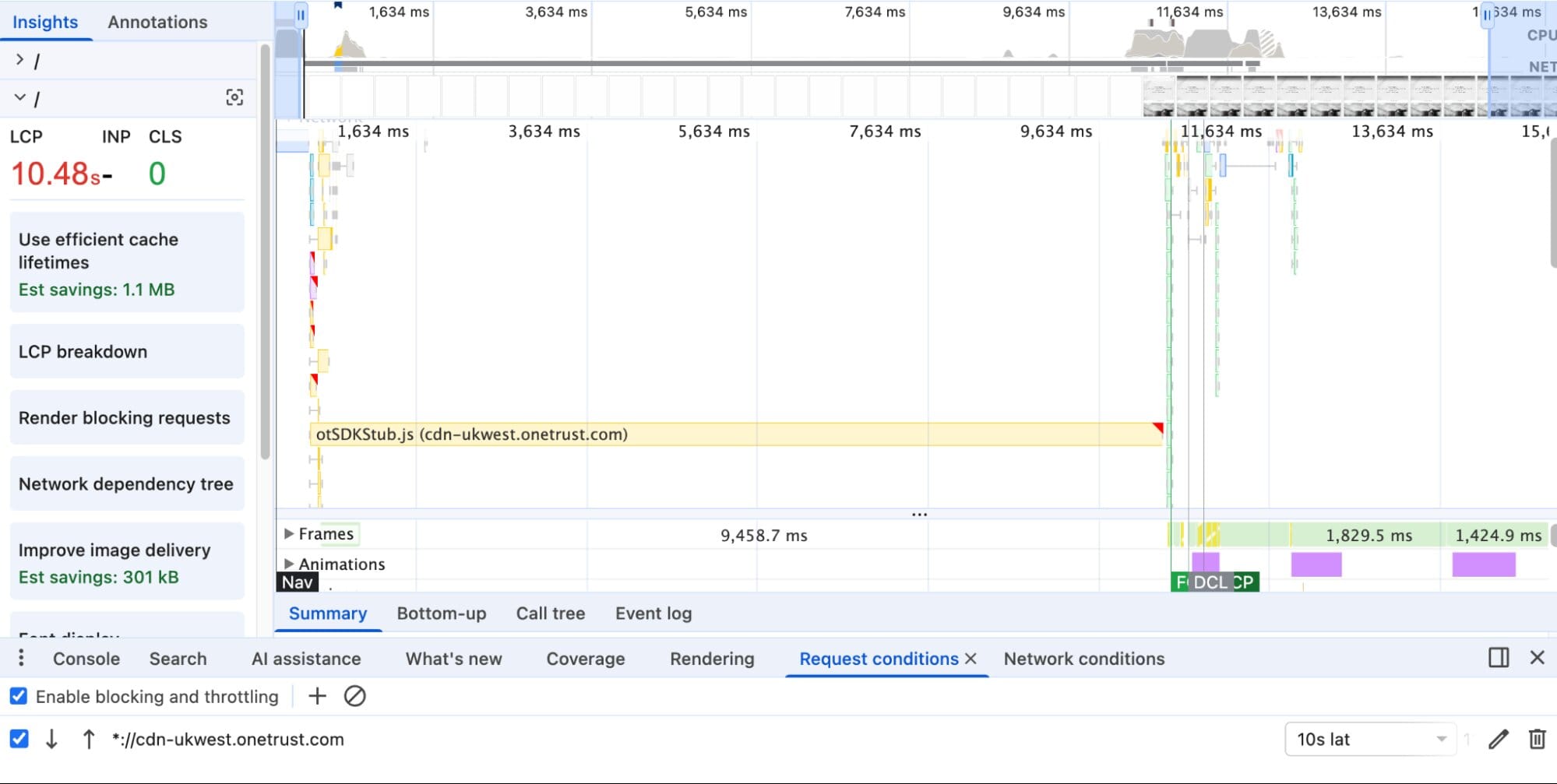
Try configuring the network throttling for a render blocking third party, and then go to the performance panel in DevTools and capture a trace with filmstrips. If you see a long gap in page rendering, then you know you have a SPOF! Here’s an example from a popular US ecommerce site I found in the HTTP Archive. It’s loading a JavaScript request for a consent management service at cdn-ukwest.onetrust.com. If I slow that down by 10 seconds and measure the page load, I can see that the FCP is also delayed by the same. Simply adding the async script tag for this third party eliminates the risk of a SPOF!
Conclusion
Third Party Single Points of Failure have been talked about for 15 years now. The problem is well understood, and there’s lots of guidance and testing approaches around this. However, that hasn’t stopped 67% of websites from adding third parties in this way!
Cloud provider and CDN outages happen, and it’s unfortunate for all involved when they do. However, someone else’s cloud provider outage shouldn’t take down your website. I highly recommend auditing your third party domains to ensure that a slowdown or failure will not result in a disruption of service on your websites. Beyond that, as a general preventive measure – try to self host as much of your render-blocking content as possible.
This article represents my own views and opinions and not those of Etsy.